
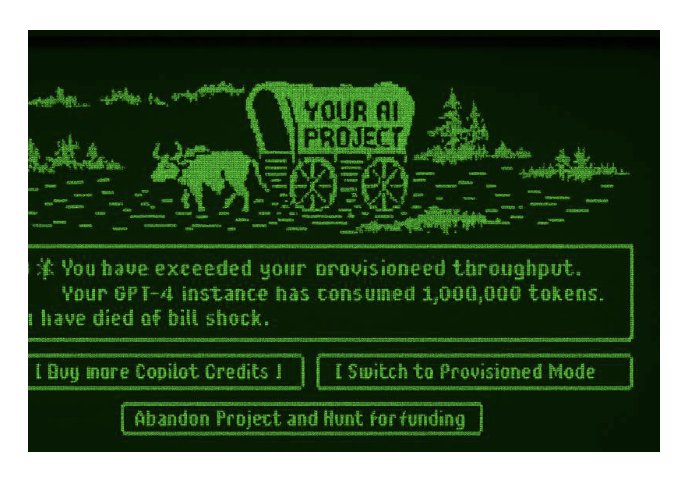
The trail of AI adoption is often littered with the shattered remains of proof of concepts and poorly planned good intentions. It can feel a lot like fording a river in Oregon Trail except instead of losing oxen, you lose budget, confidence, and stakeholder buy-in. One minute you’re building a chatbot, the next you’re staring at a billing dashboard wondering how you racked up a million tokens.
This piece will help you avoid the dreaded “You have died of bill shock” screen by understanding the fundamentals of AI costs and compare the cost models across the Microsoft AI landscape from M365 Copilot to Copilot Studio and Azure OpenAI and third-party models. Whether you’re a technical architect or a business stakeholder, this piece will show you how to model token usage, compare billing models, and plan for scale so your AI journey doesn’t end in a financial river crossing.
Understanding Tokens: The Currency of AI Usage
Most AI services today measure consumption in tokens. A token is essentially a chunk of text (roughly 4 characters on average) used by language models. All the text you send into a model (the prompt or input) and all the text it generates back (the completion or output) get broken into tokens. Costs are often charged in batches such as per 1,000 tokens processed, so the more tokens in your prompt or response, the higher the cost.
Input Tokens (Prompt Tokens): These are tokens sent in your request, for example, the text of a question, plus any system or context instructions. In Azure’s terms, prompt_tokens correspond to “Input Tokens”.
Output Tokens (Completion Tokens): Tokens in the AI’s response. In Azure’s terms, completion_tokens correspond to “Output Tokens”.
Cached Tokens: Some platforms and models optimise repeated content by caching token computations. If part of your prompt is identical to a recent prompt, the service can reuse those results instead of computing from scratch. Azure tracks these as “Cached Input Tokens”, which are billed at a discounted rate. In other words, you pay less (or nothing) for repeated tokens within a short time window. This is especially relevant in multi-turn conversations where the same context is sent repeatedly. (For example, Azure’s prompt caching can apply a large discount on cached tokens under pay-as-you-go, and up to a 100% discount under certain provisioned plans.)
All these services ultimately charge (or limit usage) based on how many tokens you consume. For instance, if you send a 1,000-token prompt and get a 500-token answer, you’ll be billed for those 1,500 tokens (with any cached portion charged at the reduced rate). Thus, understanding tokens helps you estimate costs no matter the pricing model.
AI Service Billing Models: A Comparison
Microsoft’s AI offerings use three primary billing models: license-based (fixed fee per user/app), consumption-based (“pay-as-you-go” per usage), and provisioned (pre-purchased capacity). Some offerings use a combination of models such as a capped token allowance provided by the license plus a PAYG rate for any usage beyond that allowance. Other services include certain models in the licensed-based pricing but charge a token multiplier for premium models as illustrated in the GitHub Copilot screenshot below.
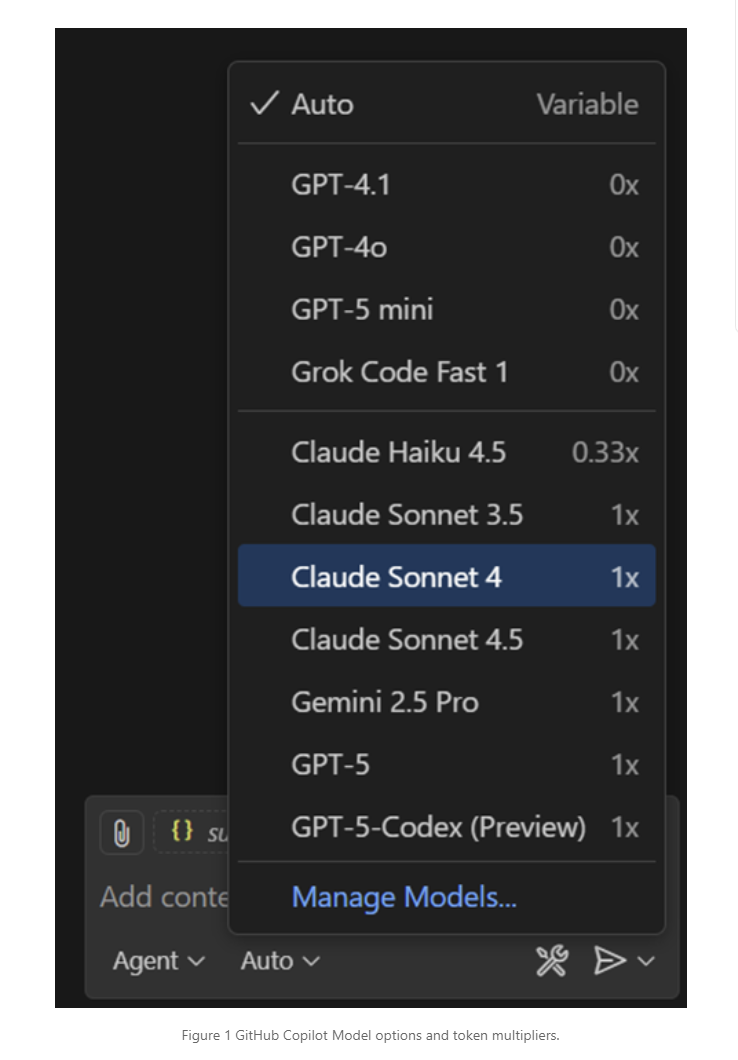
Figure 1 GitHub Copilot Model options and token multipliers.
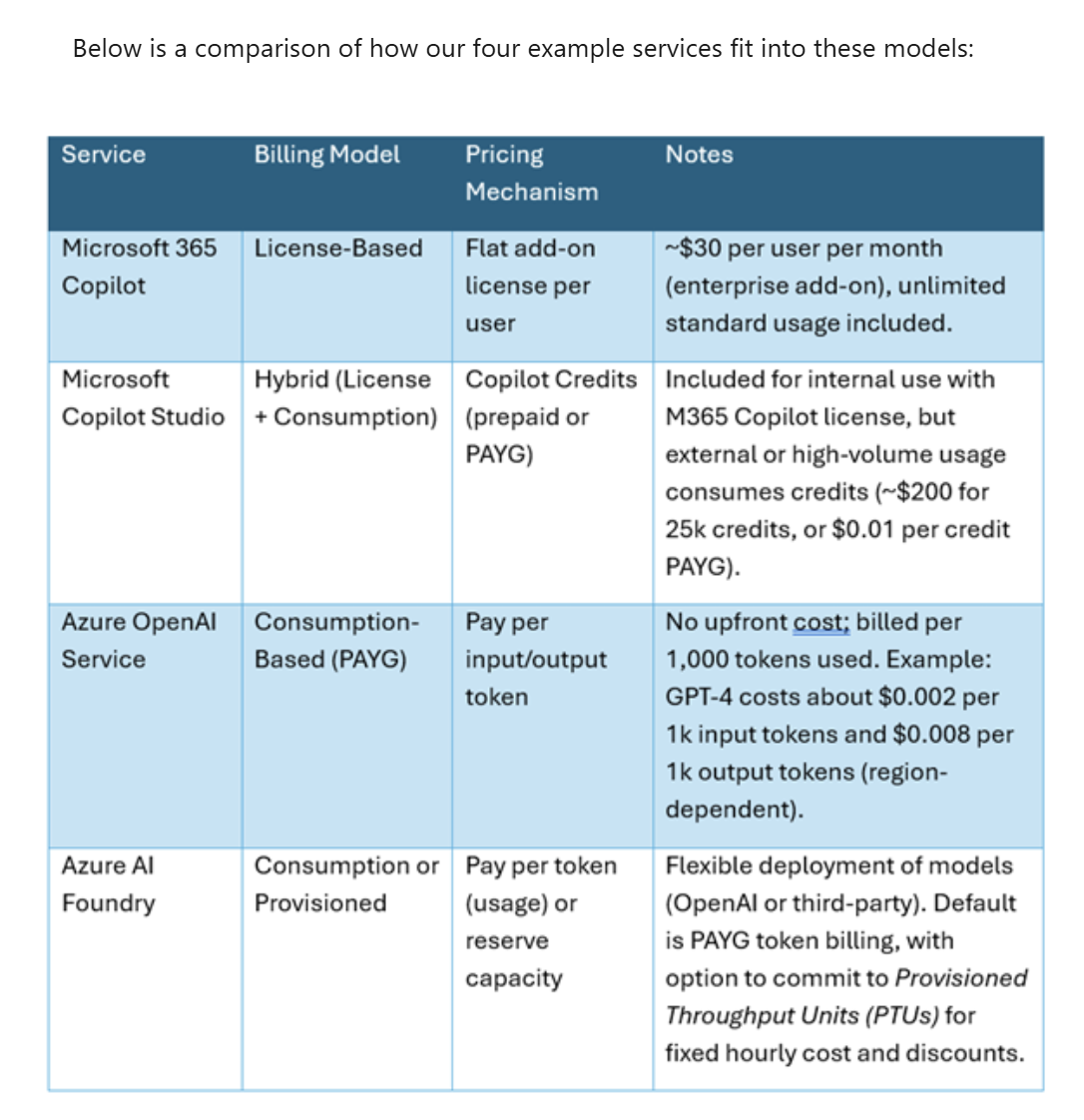
Below is a comparison of how our four example services fit into these models:
Microsoft 365 Copilot (License Model)
M365 Copilot is an AI assistant across Word, Excel, Outlook, Teams etc. and uses a license-based pricing model. Businesses pay a fixed fee per user (currently about $30/user/month for enterprise customers) to add Copilot to their Office 365 suite. This license includes unlimited usage of Copilot’s features in supported apps for that user. There is no metering of tokens or chats so the cost is predictable. (Microsoft 365 Copilot requires certain Microsoft 365 plans (like E3/E5) and is an add-on on top of those.) The upside is simplicity and predictability: one fee and you’re covered. The downside is lack of granularity i.e. you pay the same $30 whether a user invokes Copilot 100 times a day or barely at all.
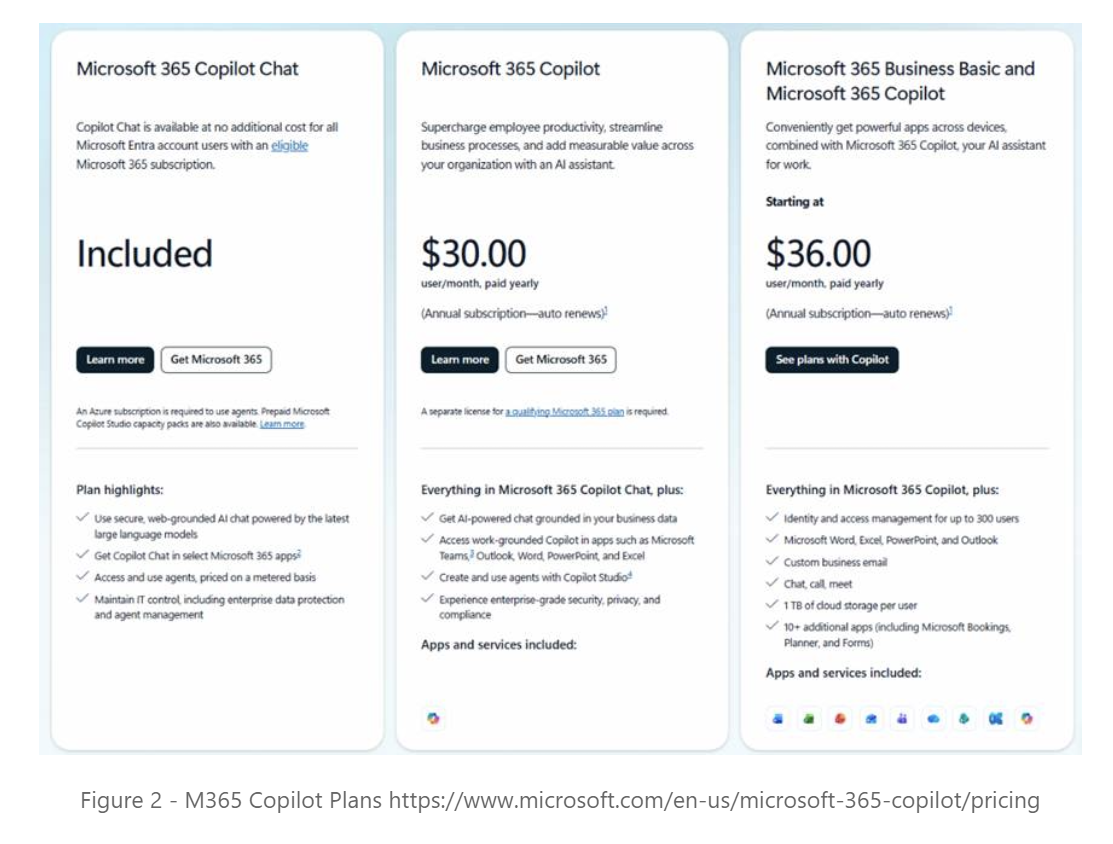
Figure 2 - M365 Copilot Plans https://www.microsoft.com/en-us/microsoft-365-copilot/pricing
Copilot Studio (Agent-Building Platform)
Microsoft Copilot Studio has a more complex model: it’s tied into Microsoft 365 licensing but also uses consumption credits. If you have an M365 Copilot tenant, building internal agents in Copilot Studio is enabled at no extra license cost. End-users with a Copilot license can even use those agents in Teams/SharePoint without incurring additional charges in many cases. However, Copilot Studio introduces Copilot Credits as a unit of consumption for agent interactions. Each user interaction (question, action, or generation) with a studio-built agent consumes a certain number of credits based on its complexity. For example, a simple Q&A might be 1-2 credits, a more complex task with data grounding or tool usage might consume 5-10 credits.
The Copilot Studio Estimator tool (https://microsoft.github.io/copilot-studio-estimator) allows you to model the costs of different usage scenarios and usage volumes and download the results for later validation.
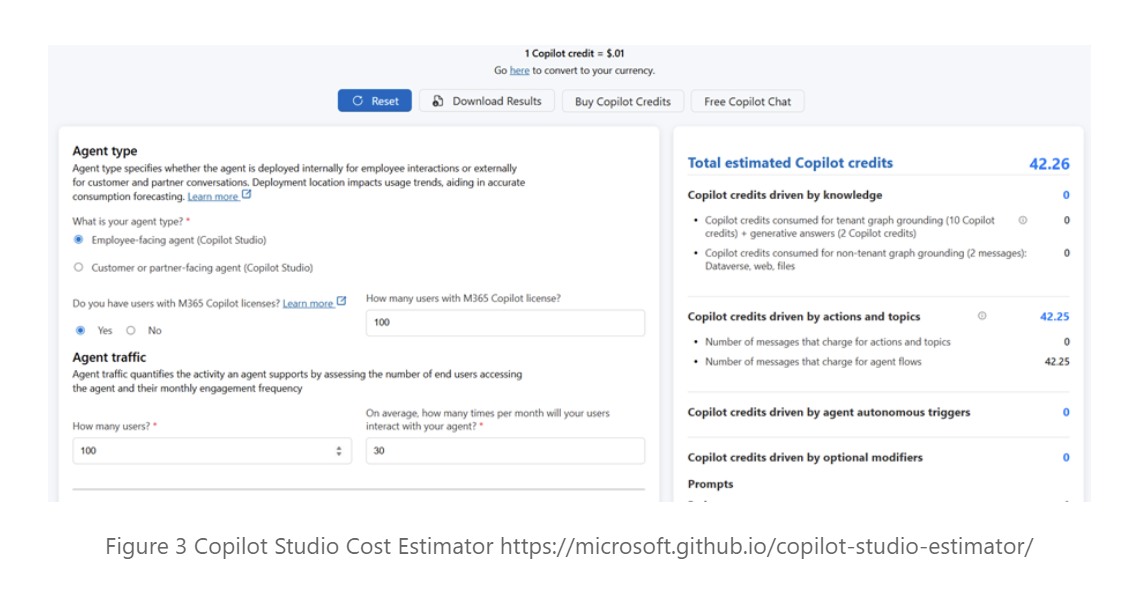
Figure 3 Copilot Studio Cost Estimator https://microsoft.github.io/copilot-studio-estimator/
This hybrid approach gives predictable capacity via packs (budgeting for a known volume of interactions) while allowing burst usage via PAYG for spikes. Copilot Studio’s cost model is license-based access plus consumption-based metering for the AI workload itself. It’s designed so that internal, moderate usage is largely covered by existing Microsoft 365 Copilot licenses, but large-scale or external-facing deployments will incur consumption charges.
Azure OpenAI Service (Pay-as-You-Go Consumption)
Azure OpenAI Service is a fully consumption-based model: you pay only for what you use in terms of model processing (no per-user fee). Costs accumulate based on the number of input and output tokens processed by the model, with different rates for different models. For example, as of late 2025 Azure’s pricing for the GPT-4 series is about $2 per 1M input tokens and $8 per 1M output tokens in the standard tier. In more familiar terms, which equates to ~$0.002 per 1000 input tokens and $0.008 per 1000 output tokens. Advanced models or special deployments can cost more (e.g. an advanced “GPT-5” model might have higher rates). You are billed monthly for actual usage. There is no minimum fee so if you only use 500 tokens one month, you only pay for 500 tokens (fractions of a cent).
The Azure Pricing Calculator (https://azure.microsoft.com/pricing/calculator) provides a valuable tool for modelling AI costs across usage volumes, token patterns and AI models. In the example below, the monthly costs for a new AI workload can be estimated based on projected token volume and patterns. The estimate can be recalculated using different usage scenarios and different models to understand the projected costs.
As a minimum model the following scenarios:
Minimum, lower than expected usage.
Expected usage based on business/scenario modelling.
High volume usage, AI app goes viral within the user community it is exposed such as internal, nominated external or open public users.
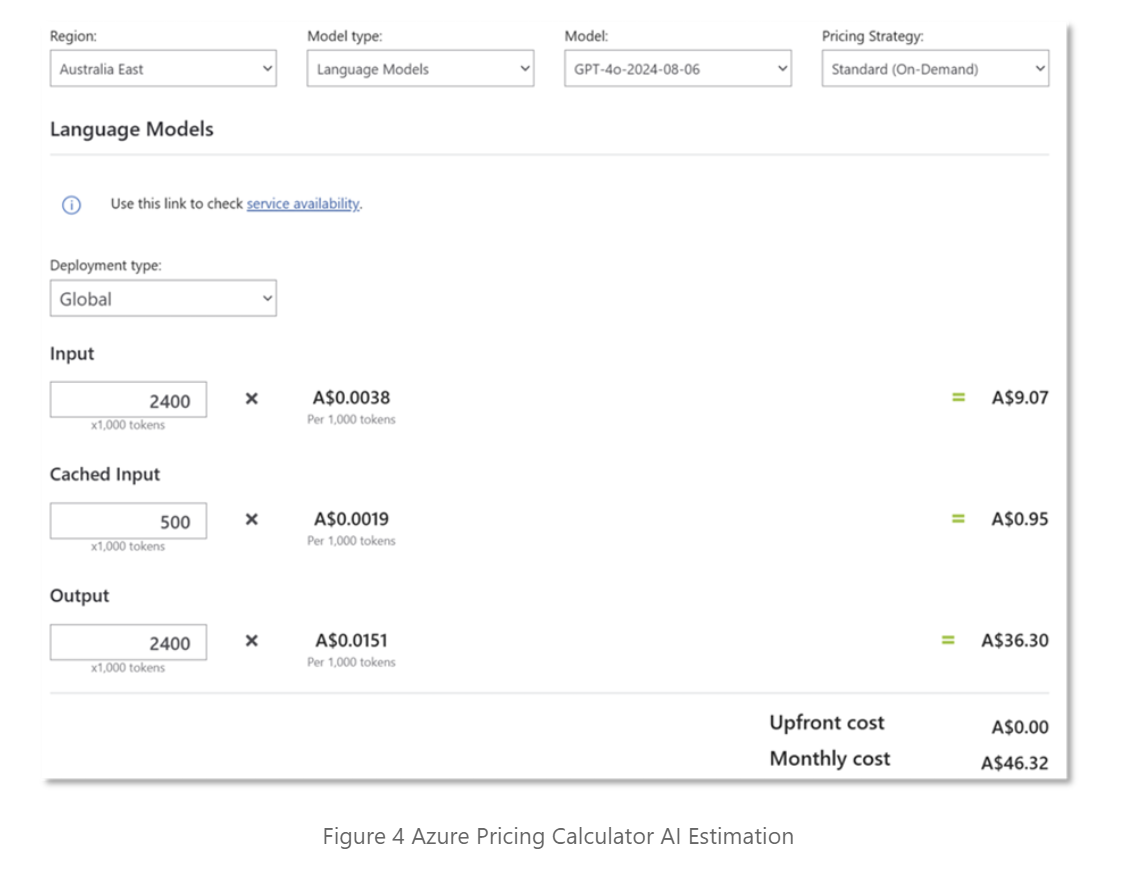
Figure 4 Azure Pricing Calculator AI Estimation
Azure also provides an option for “Provisioned throughput” in Azure OpenAI (and Azure AI Foundry) for heavy usage scenarios. With provisioned throughput, you commit to a certain capacity of the model in advance (measured in PTUs e.g. blocks of model compute) and pay a fixed hourly rate regardless of usage. This essentially reserves dedicated capacity for you. The cost is predictable (e.g. a certain number of PTUs for GPT-4 might cost ~$15/hour on a PAYG basis, or much less if reserved annually), and in exchange you get guaranteed throughput and potentially discounted token rates. Provisioning is useful if you have high, steady usage (it can reduce cost per token compared to pure PAYG) or require consistent low-latency performance. Otherwise, most users stick to the default on-demand model: pay per token.
Azure AI Foundry (Advanced AI Platform)
Azure AI Foundry is Microsoft’s enterprise AI app and agent platform, which offers flexible billing that can span both pay-as-you-go and provisioned models. In practice, the token-based consumption in Foundry works much like Azure. You’ll be charged for the tokens your AI applications use, with prices depending on the model type, size, and deployment region.
Azure AI Foundry is geared toward large-scale, custom AI solutions allowing you to:
Train or integrate third-party models (like open-source or partner models) from the model catalogue
Deploy in various modes (global, containers, regional zones)
Foundry-specific features like integrated search or multimodal capabilities.
Interactive playgrounds for rapid evaluation of models
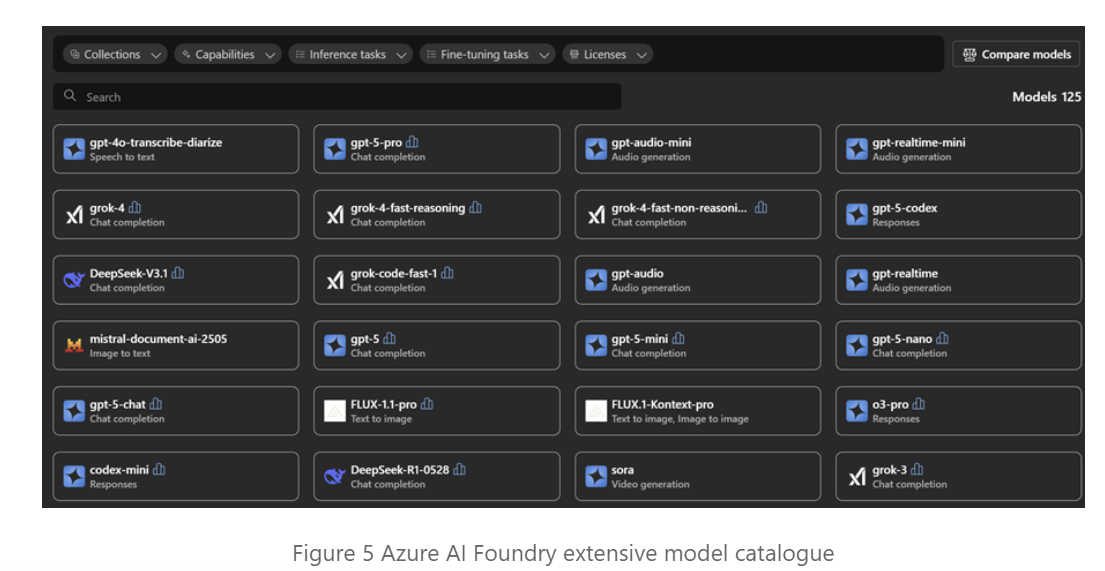
Figure 5 Azure AI Foundry extensive model catalogue
A key capability of AI Foundry is the ability to use Provisioned Throughput Units (PTU’s) to allocate a certain capacity for a model deployment at a fixed cost. For example, reserving a GPT-4 capacity of 15 PTUs might be on the order of $260/month (with an annual commitment) for global deployment, yielding a substantial discount vs. purely usage-based costs. In contrast, using it purely on-demand would charge by tokens at the standard rates which could cost thousands of dollars for the same volume if heavily used. Azure AI Foundry gives you the most control and flexibility as a “build your own AI service” platform where you pay either per use or per capacity.
Conclusion and Best Practices
There are a range of dimensions to consider when selecting a platform for your AI application:
Audience: are they internal, partners or customers? Different licensing models better align with different audience types
Data Sources: what information does the AI need access to and how can that be done securely?
Responsiveness: how quickly do the users need an answer? Is this an interactive conversation or a task to be completed asynchronously?
Modelling the costs of AI services is an equally important step to ensure you choose the right AI approach to deliver sustainable business value for your use case and expected usage.
Microsoft 365 Copilot offers a predictable per-user licensing model, ideal for broad internal rollout if you’re willing to pay a premium for unlimited usage.
Copilot Studio provides a way to build custom AI agents with a mixed model included usage for licensed Microsoft 365 users plus a credit-based consumption system for additional workloads.
Azure OpenAI Service is pure pay-as-you-go and a good choice for prototyping, unpredictable workloads, or scaling external applications. You pay by the token, so efficiency and usage patterns directly translate to cost.
Azure AI Foundry is a full-featured platform that largely follows consumption-based pricing but adds enterprise options like reserved capacity and integration of various models. It’s suited for advanced scenarios where customization and possibly large-scale usage justify a more complex setup.
When planning or developing cost models, keep these considerations in mind:
Stay Current on Pricing: AI model pricing is evolving rapidly. The token prices cited (e.g. for GPT-4) are current as of late 2025; always check the official Azure pricing page for the latest numbers, as models get cheaper (or new, more capable models may cost more).
Use Cost Management Tools: Azure provides cost calculators and metrics. There are even third-party token cost estimator tools. These can help convert expected usage (e.g. X calls of Y tokens each) into monthly cost projections.
Optimise Usage: If you’re on a consumption model, you can control costs by optimising prompts and leveraging features like caching. For example, reuse a system prompt across calls (so it caches), or limit the length of outputs to what’s needed. Choosing a lower-cost model for simple tasks is another way (e.g. use GPT-3.5 for basic queries at a fraction of GPT-4’s cost).
Understand Licenses: If you have Microsoft 365 Copilot deployed, use it for what it’s good at: productivity within Office apps. For any custom solutions, decide if they justify the additional Azure OpenAI/Foundry costs or if they can be achieved with the built-in Copilot capabilities. Also track Microsoft announcements as features like Copilot Chat in Windows or other AI services might be included with certain licenses at no extra cost.
Plan for Scale: If usage is predictably growing, compare the cost trajectories of staying pay-as-you-go versus committing to a license or reserved capacity. As we saw, heavy usage of Azure OpenAI might reach a crossover point where a provisioned plan or an enterprise license becomes more economical.
By understanding these cost models and modelling your specific scenarios, you can avoid surprises and make informed decisions on how to deploy AI solutions. Whether you’re a technical architect calculating token costs, or a business stakeholder evaluating ROI on that $30 Copilot license, the goal is the same i.e. align the service’s value with its cost. Microsoft’s range of offerings provide you the flexibility to choose the model that fits your needs and budget. Understanding the various pricing models and their implications is critical to make your AI project a sustainable success.
In a follow-up post we will walk through a real-world AI project in detail to:
Analyse the AI options based on a specific business scenario.
Model the potential costs and select the AI options/s to evaluate.
Collect the data to validate the technical and cost alignment with business goals.
Develop an evidence-based cost model to get the AI solution to production.
discover@nexwave.com.au | Build Tomorrow Today